
Start with a value you can verify
An order ID is an identifier, not a quantity to calculate. When a JSON file is hard to read, the immediate task is usually to add indentation—not to change the values. Use this synthetic order to check the result before formatting an important file.
Try the workflow
Open AGMAD JSON Formatter. Paste the sample below, choose Format and inspect the orderId. Then choose Minify on the formatted result. The minified text should match the original sample exactly. Copy only after checking the output.
{"orderId":9007199254740993,"customer":"أجمد","items":[1,2]}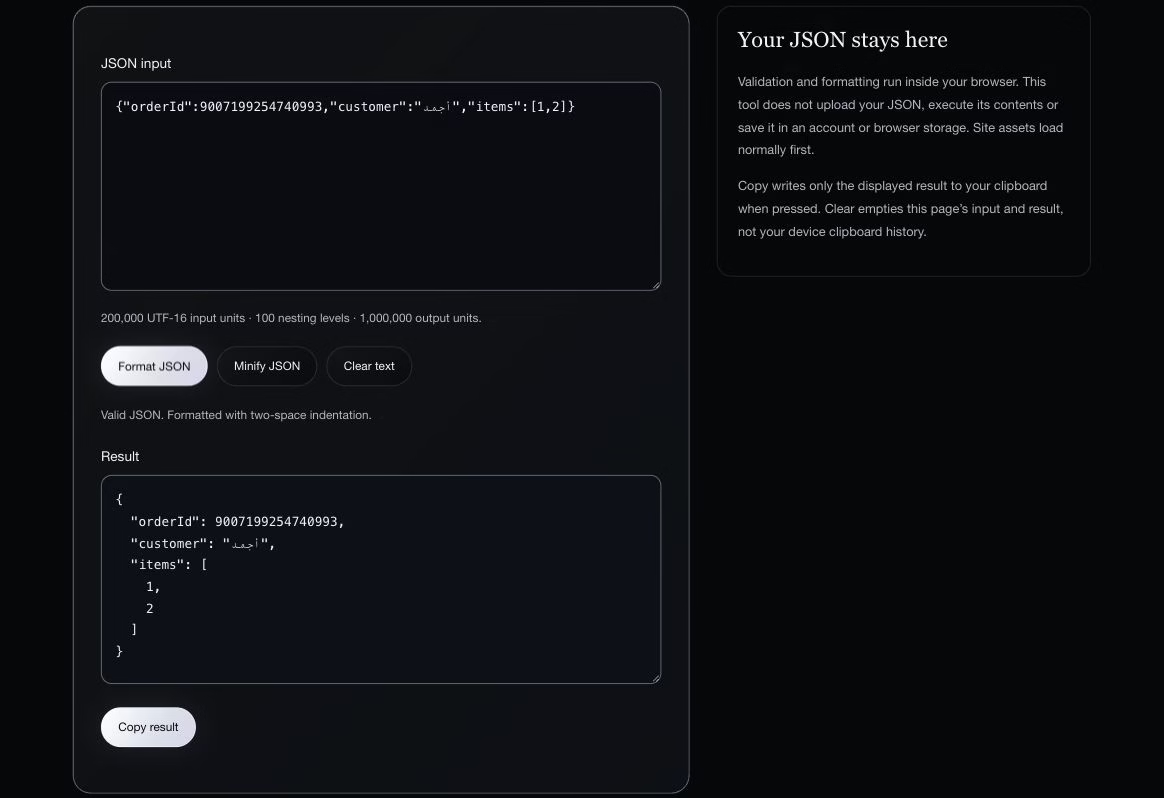
What the example proved
The current engine kept 9007199254740993 exactly as written and preserved the Arabic customer name and array order. The example was executed against the local version 1.0.0 engine; it does not test your downstream application or clipboard permissions.
Why formatting and parsing are different
A program can read JSON into its own number representation and then serialize it again. That workflow may change values the program cannot represent exactly. This formatter uses JSON.parse to check syntax, but does not serialize that parsed result. It rebuilds layout from the original tokens, changing insignificant whitespace while keeping raw numbers and string escapes.
A useful failure test
Try {"items":[1,2,]}. The trailing comma is invalid JSON, and this engine rejects it. A formatter cannot decide which business value you intended. Correct the source using the requirements of the system that produced or consumes it.
Know the limits
This is not JSON Schema validation. A syntactically valid document can still have the wrong fields or business values. Duplicate keys are retained, which does not make them a good interchange format: downstream readers may handle them differently. Input is limited to 200,000 UTF-16 units, nesting to 100 and output to 1,000,000 units. The tool is for formatting, not repairing every form of JavaScript-like data.
Before you use the result
Keep the original, compare the fields that matter, and test the receiving application with a safe example. The tool processes text in the browser and does not upload its input through the inspected engine; loading site assets still requires a connection. Browser extensions and clipboard history are outside that processing promise.